
Activity log - sign-ins and visits
See who signed in to the Hub, who was refused, and what each visit read, searched and asked.
Updated
The Activity screen in the head office console answers two questions: "who tried to sign in, and what happened?" and "what did each visit do?" It is for head office only. Every row shows a real email address, so do not copy what you see here into emails, chats or documents. The examples in this topic use demo people only.
Find a sign-in
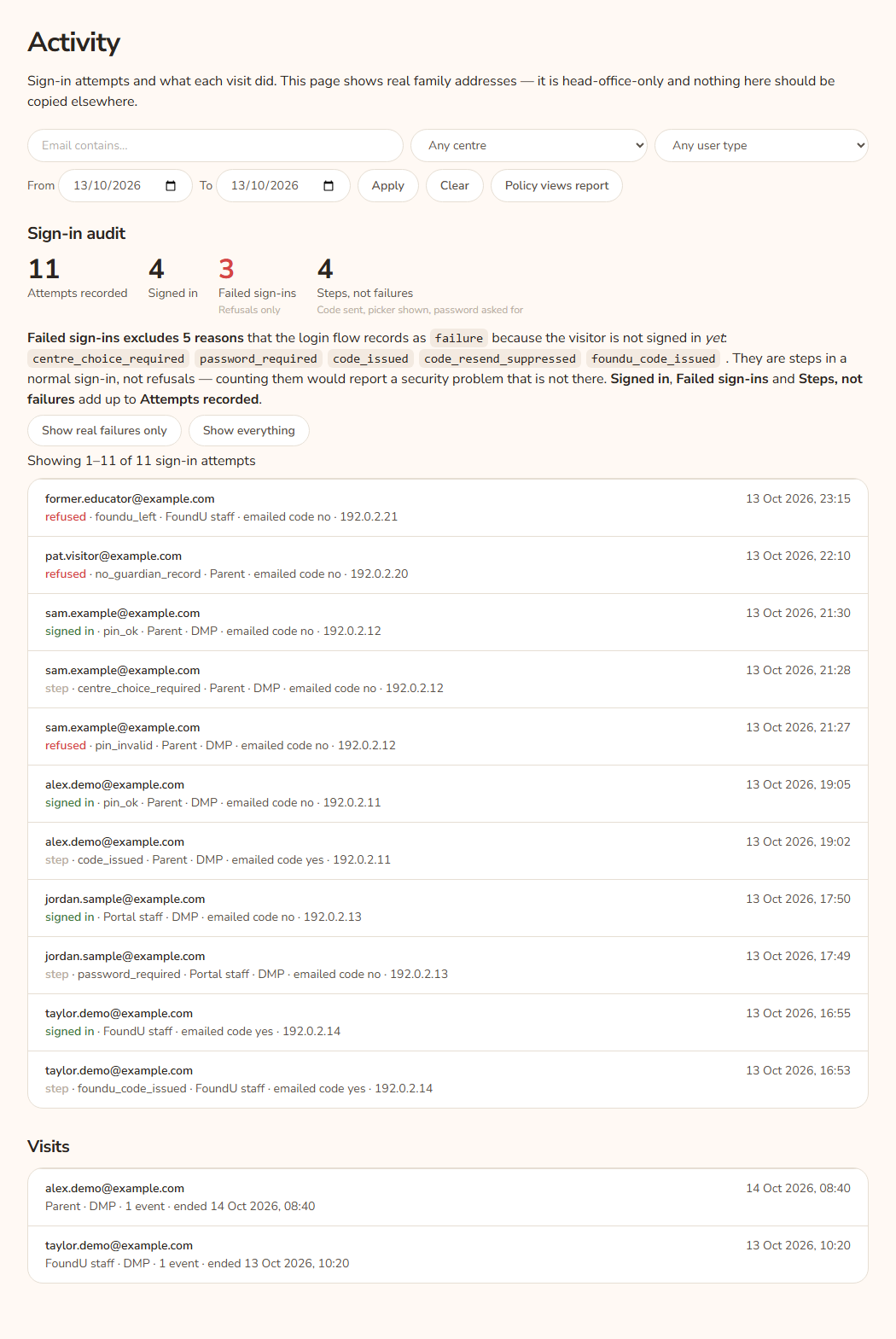
- Open Activity in the console sidebar.
- Use the filter bar at the top. Type part of an email in Email contains…, or pick a centre, a user type, or a From and To date.
- Press Apply. Both lists on the page (Sign-in audit and Visits) use the same filter.
- Press Clear to remove the filter.
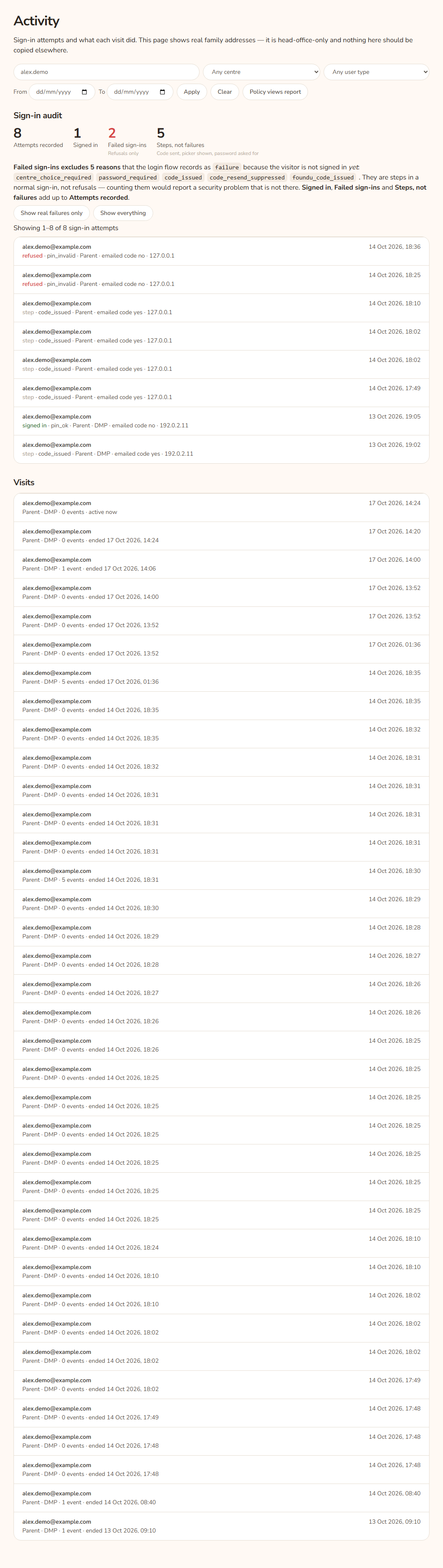
Example: A parent, Alex Demo, says the code never arrived. Type alex.demo in Email contains… and press Apply. The sign-in list shows each attempt in time order, newest first, with a plain reason on each row. A row reading "step · code_issued" means the Hub did send a code.
Read the four numbers
Under Sign-in audit there are four figures:
- Attempts recorded is every attempt that matches the filter.
- Signed in counts attempts that ended in a sign-in.
- Failed sign-ins counts refusals only. A refusal is a sign-in that was turned away. If this number is red, there is at least one.
- Steps, not failures counts normal steps in the middle of a sign-in. Examples are "code sent", "centre picker shown" and "password asked for".
The three figures Signed in, Failed sign-ins and Steps, not failures add up to Attempts recorded. They are shown apart on purpose. A person who has not signed in yet is not a failure. Counting steps as failures would look like an attack when it is only a queue of people signing in normally.
The text under the figures says "Failed sign-ins excludes" and then a number of reasons, and lists each one. These are the step reasons. They are centre_choice_required, password_required, code_issued, code_resend_suppressed and foundu_code_issued.
Show only the real refusals
Press Show real failures only to list refusals and hide steps. Press Show everything to go back. The line above the list says how many matched, for example "Showing 1–3 of 3 sign-in attempts (refusals only)".
Read one sign-in row
Each row shows the email and the time. The second line shows:
- signed in, refused or step (green, red or grey).
- The reason, if there is one, after a dot.
- The user type, in words: Parent, Portal staff, FoundU staff, Admin or Head office viewing as a parent.
- The centre code, if the Hub knows it.
- "emailed code yes" or "emailed code no". This says whether this attempt used the emailed code. "No" with the reason
pin_okmeans the person used their centre PIN. - The address the request came from, if known.
What the reasons mean
| Reason | Plain meaning |
|---|---|
invalid_email |
The box was empty or the text was not an email address. |
rate_limited |
Too many tries from this address or place in a short time. The person was asked to wait. |
no_guardian_record |
The address is not a known family address. |
archived_at_centre |
The family record at the centre is archived. |
waitlist_login_disabled |
The family is on the wait list and wait-list sign-in is switched off. |
centre_not_visible |
The family's centre cannot show the library. |
removed_from_xap |
The family was in the Hub, but the nightly sync no longer sees them in Xap. |
centre_choice_required |
Step: the person has more than one centre and was asked to pick. |
password_required |
Step: a KAL Portal user was asked for their password. |
code_issued |
Step: a code was emailed. |
code_resend_suppressed |
Step: a code was already sent a moment ago, so a second one was not. |
foundu_code_issued |
Step: a code was emailed to an educator from foundU. |
pin_ok |
The centre PIN matched. This is on a signed-in row. |
portal_sso_ok |
The person signed in with "Sign in with KAL Portal". This is on a signed-in row. |
portal_staff_sso_ok |
An educator signed in through the KAL Portal. This is on a signed-in row. |
staff_code_disabled |
An educator typed an emailed code, but educators now sign in through the KAL Portal, so the code was not used for a staff sign-in. |
pin_invalid |
The PIN was wrong, or was not four digits. |
pin_not_set |
The family has no PIN on file, so they should use the emailed code. |
pin_rate_limited |
The daily limit for PIN tries was reached, or could not be checked. They can still use the emailed code. |
pending_expired |
The person took too long on a step and had to start again. |
centre_not_eligible |
The centre they picked is not one they can use. |
code_missing |
No code was waiting for this address. |
code_invalid |
The code was wrong. |
code_expired |
The code was too old. |
code_attempts_exceeded |
Too many wrong guesses on one code. |
code_send_failed |
The Hub could not send the email. See Email log. |
staff_not_found |
No active KAL Portal user has this email. |
sso_only |
The Portal account signs in with Microsoft, not a password. |
invalid_password |
The Portal password was wrong. |
staff_no_centre |
The Portal user has no centre. Head office needs to fix their Portal record. |
foundu_left |
The educator's foundU status is Archived. They have left. |
foundu_not_employed |
The educator's foundU status is Declined or Prospective. They were never employed. |
foundu_status_unrecognised |
foundU has a status the Hub does not know. Head office should decide if the person works here. |
foundu_no_centre |
The educator works here but their centre cannot be shown. |
error |
Something unexpected broke. See Errors. |
Read the Visits list
Under Visits there is one row per visit. Each shows the email, when the visit started, the user type, the centre, the number of events and the state:
- active now: the person was seen in the last 15 minutes.
- idle since a time: the visit is still open but nothing has happened for more than 15 minutes.
- ended a time: the person signed out, or the Hub closed the visit after it sat idle too long. See Signing out and timeouts.
Press an email to open that visit below the list.
One visit
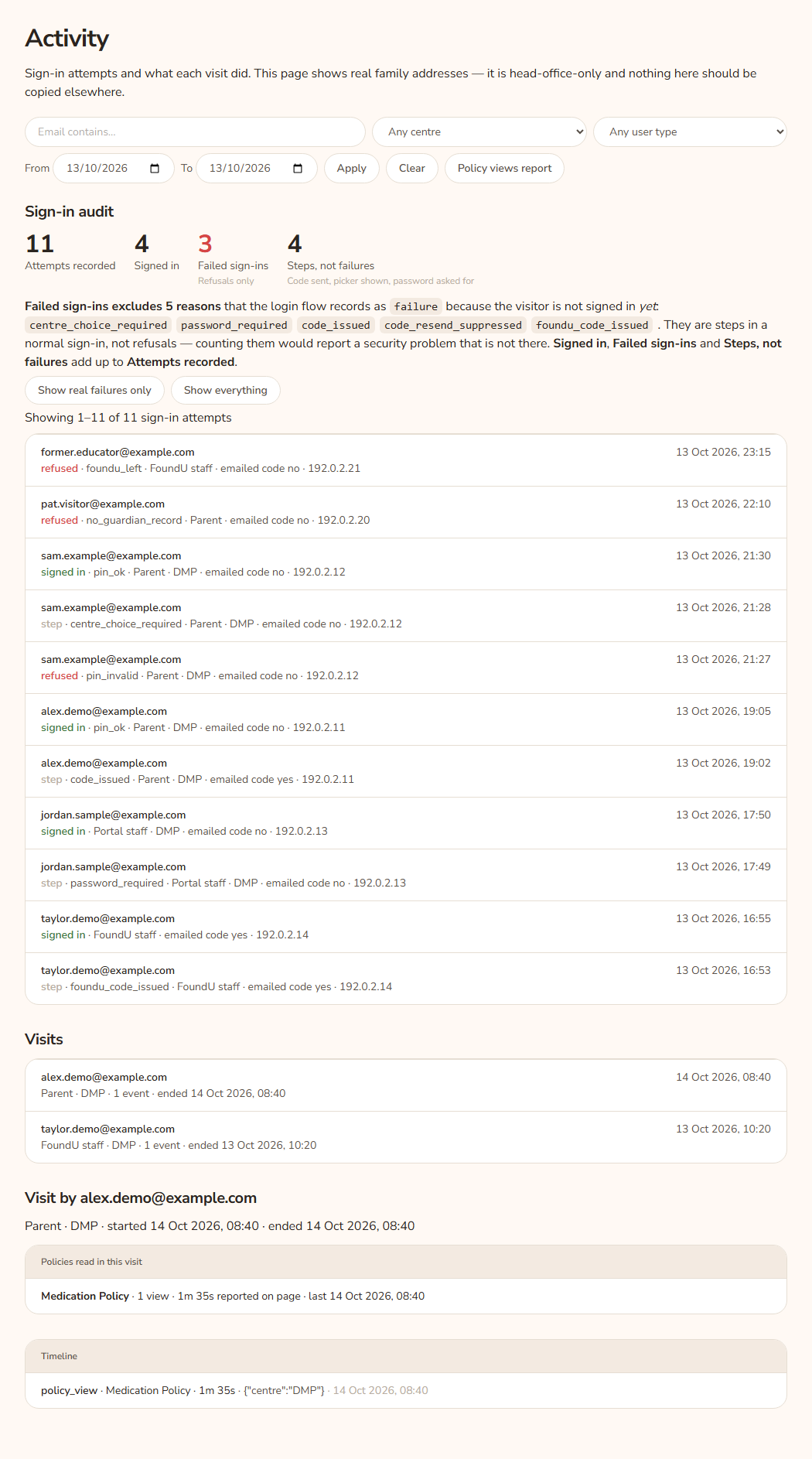
- A heading "Visit by" and the email, with the user type, centre, start time, state and address.
- Policies read in this visit: each policy, how many views, the time on the page and the last view time. The time is reported by the person's own browser. It is a hint, not an exact measure. If nothing was read it says "None."
- Timeline: each event in order. Events are
login,logout,policy_view,search,chat_question,print,pdf_downloadandcentre_switch.
Example: Jordan Sample, a centre staff member at Demo Park, opens a visit and the timeline shows policy_view for a policy, then print. This tells you Jordan opened the policy and printed it.
Every option
| Option | What it does | Default |
|---|---|---|
| Email contains… | Shows rows whose email contains the text you type. | Empty (all) |
| Centre | Limits both lists to one centre. The list shows each centre as code and name. | Any centre |
| User type | Limits to Parent, Portal staff, FoundU staff, Head office viewing as a parent or Admin. The Visits list shows the same words. | Any user type |
| From | Earliest date to include. | Empty |
| To | Latest date to include. | Empty |
| Apply | Runs the filter. | |
| Clear | Removes every filter. | |
| Policy views report | Opens the policy views report. | |
| Show real failures only | Lists refusals only and hides steps. | Shows everything |
| Show everything | Lists refusals, steps and sign-ins. | On |
| Older → and ← Newer | Move through pages of 100 sign-in rows. These show only when there is more than one page. | Page 1 |
| (email on a visit row) | Opens that visit and its timeline. |
Questions
Why is "Failed sign-ins" lower than I expected?
Steps are not counted as failures. A person asked to pick a centre or sent a code has not been refused. Look at Steps, not failures next to it.
A parent says "I can't sign in". Where do I start?
Search for their email and read the latest rows. The reason tells you what to do. Then see Sign-in problems for what to tell them.
Can I tell if someone used a PIN or a code?
Yes. A signed-in row with the reason pin_ok used a centre PIN. A row with "emailed code yes" used a code. A row with the reason portal_sso_ok used "Sign in with KAL Portal". A row with the reason portal_staff_sso_ok is an educator who signed in through the KAL Portal.
Why does a visit say "idle since" when the person has left?
A visit only ends when the person signs out or the Hub closes it after the idle time. Until then it stays open and shows "idle since" after 15 minutes of no activity.
Why do two lists show different counts?
The four figures count the whole filter. The sign-in list shows 100 rows per page. The line "Showing 1–100 of 230" says how many rows there are in total.
If something goes wrong
- "No sign-in attempts match this filter." There are no attempts for the filter. Press Clear and try again with fewer filters.
- "No sign-in attempts on this page — the filter may have moved since the link was made." You are on a page number past the end. Press Clear.
- "No visits match this filter." There are no visits for the filter.
- "None." (under Policies read in this visit) The visit read no policies.
- "No events recorded for this visit." The visit has no events.
- If the page shows a 404, you are not signed in to the head office console. See Console tour.