
Ask KAL logs - what families asked
Review the questions families asked Ask KAL, the answers given, which policies were cited, and spot answers that were not backed by a quote.
Updated
Ask KAL Logs in the console shows every question a family or staff member asked Ask KAL, the answer it gave and the policies it said that from. It is for head office only. Each row has a real email address and a real question, often about a child, so do not copy it elsewhere. Examples here use demo people.
The page exists so someone is watching. An answer paraphrases a policy, so a wrong answer does not look wrong on any screen. This is the place to check.
Review the questions
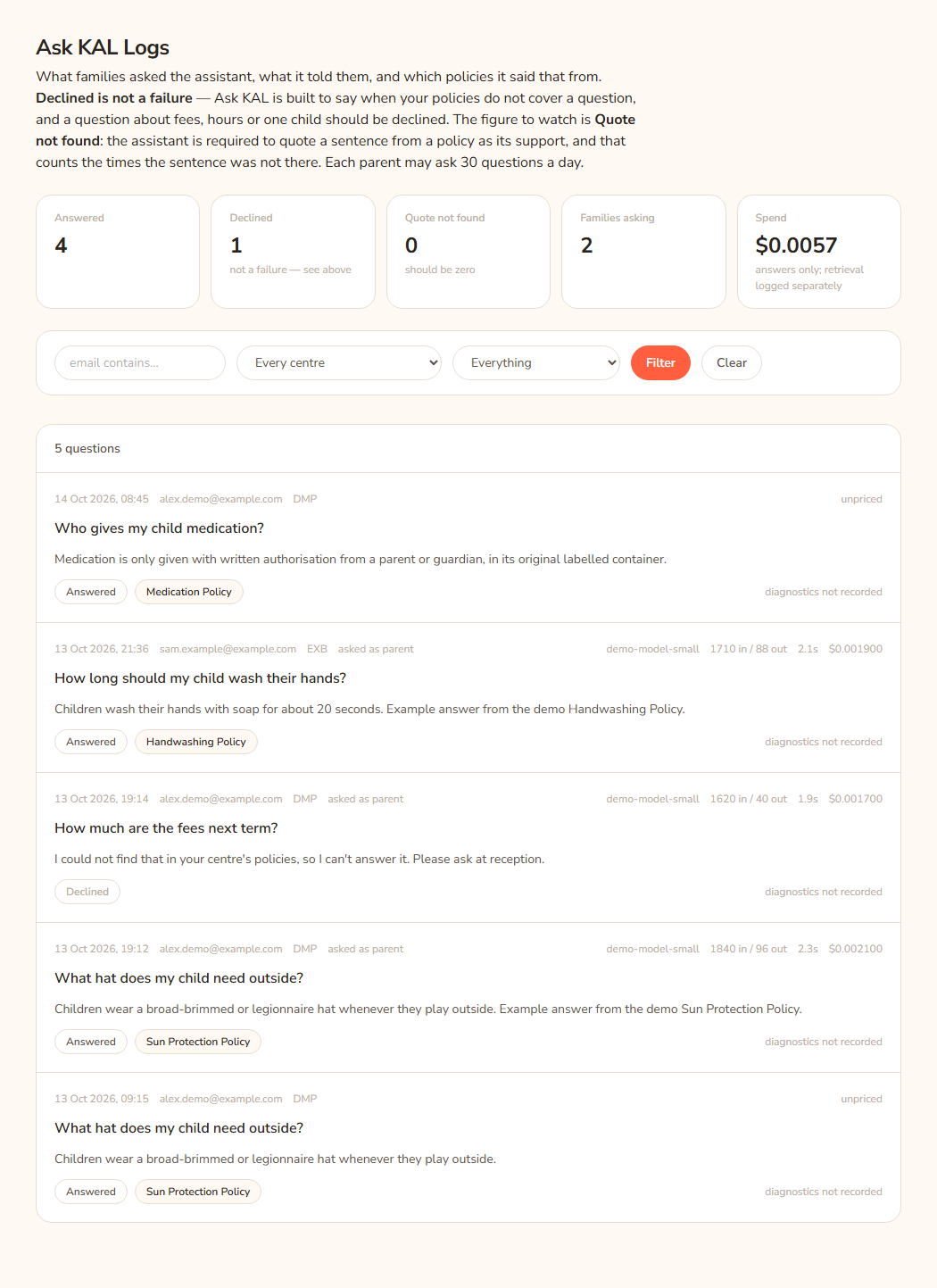
- Open Ask KAL Logs in the console sidebar.
- Read the five tiles at the top.
- To narrow the list, type part of an email in email contains…, pick a centre, or pick Declined only or Quote not found only under Everything. Press Filter.
- Read each row: the question in bold, the answer under it, and the small labels at the bottom.
- Press a policy title on a row to open that policy in the console.
- Press session on a row to open the visit in Activity.
- Press Clear to remove the filter. Use Older → and ← Newer to page through 50 questions at a time.
Example: Alex Demo asked "Can Mia wear a cap outside?" The row shows the answer, the label Answered, and one policy button, "Sun protection". That is a good result.
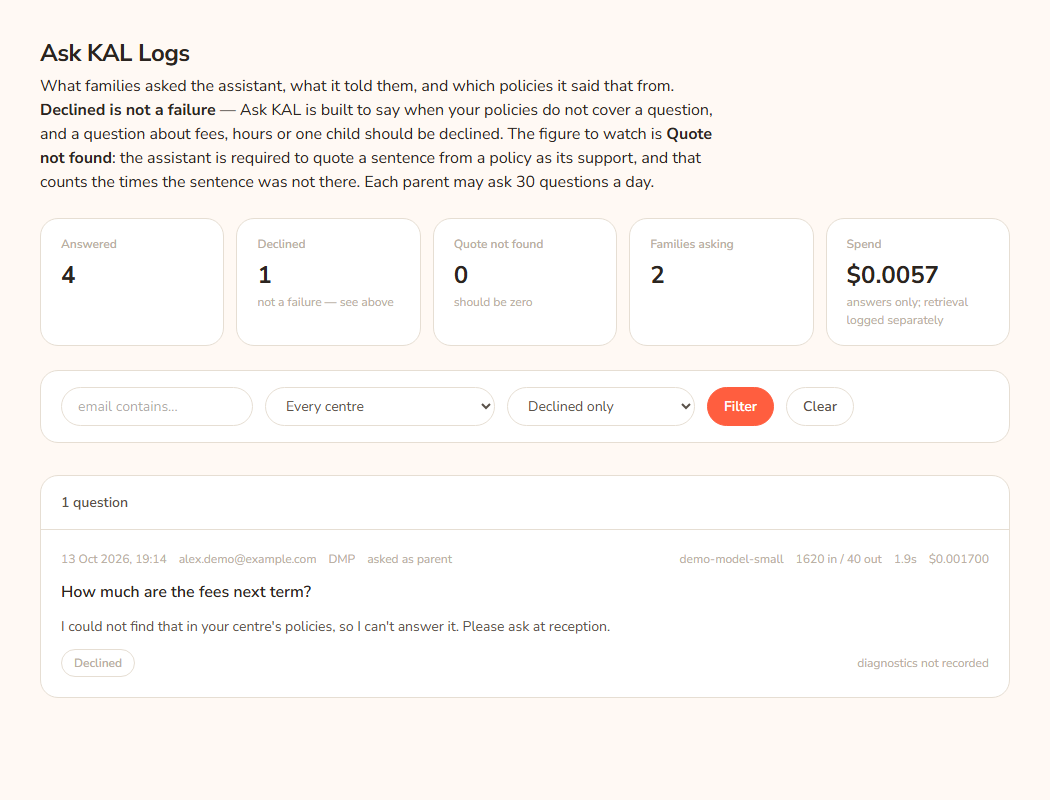
The five tiles
- Answered: questions the assistant answered from a policy.
- Declined: questions the assistant refused because the policies do not cover them. Its note says "not a failure — see above".
- Quote not found: answers where the sentence the assistant quoted as proof could not be found in the policy extracts it was given. Its note says "should be zero". The tile turns coral when it is above zero.
- Families asking: how many different people asked.
- Spend: money spent on answers, in US dollars. Its note says "answers only; retrieval logged separately".
Answered and Declined add up to every question.
Read one row
Top line: the time, the email, the centre code, the user type, and "asked as" (parent or staff) when it was recorded. On the right: the model name, tokens in and out, seconds taken and cost. A cost reading "unpriced" means the model has no price in the Hub's list.
Bottom line labels:
- Answered or Declined.
- The policies cited, as buttons.
- Quote not found in the policy: the quote check failed. The answer was still shown to the family.
- "dropped N invented citations": the assistant named an extract that was never given to it. The Hub removed it.
- "downgraded:" and a reason: the assistant said it answered, but the Hub turned it into a refusal. Reasons are "the model's reply could not be parsed", "the answer cited N extract number(s) that were never supplied", or "the answer cited nothing, and an uncited answer is not an answer".
- "N cited policy since deleted": a policy that was cited is gone.
- "model call" and a status: the call to the AI provider did not finish well.
- "N candidate chunks → N extracts · top 0.512": how many pieces of policy were found and used, and the best match score. "diagnostics not recorded" means older rows with no detail.
Daily limit
Each person may ask 30 questions a day. After that Ask KAL stops answering for about 24 hours. They can still search and read the library.
Every option
| Option | What it does | Default |
|---|---|---|
| email contains… | Shows questions from emails containing the text. | Empty |
| Every centre / centre list | Limits to one centre. | Every centre |
| Everything | Shows all questions. | On |
| Declined only | Shows only declined questions. | |
| Quote not found only | Shows only answers where the quote check failed. | |
| Filter | Applies the filter. | |
| Clear | Removes the filter. | |
| ← Newer / Older → | Move between pages of 50. | Page 1 |
| Policy button on a row | Opens that policy in the console. | |
| session | Opens that visit in the Activity screen. |
Questions
Why was a good question declined?
Sometimes Ask KAL refuses a question the library does answer. This is on purpose. It prefers to say "I do not know" over guessing. Families can still search the library.
What do I do about a "Quote not found" row?
Open the cited policy and read the answer against it. If the answer is right, nothing more is needed. If it is wrong, tell the person who looks after policies. The family has already seen the answer.
Can I turn Ask KAL off?
Yes, with the Ask KAL switch on the Settings screen. See Settings overview. When it is off, families see "Ask KAL is turned off just now. Your centre's policies are all still here to search and read, and reception can answer anything you cannot find."
Where is the cost of Ask KAL in total?
Spend here counts answers only. For every AI call, including embeddings and Quick Guides, see AI calls.
If something goes wrong
- "Nothing matches" is shown above the list when no question fits the filter.
- "(no question recorded)" appears in italics on a row with no question text.
- A family may see "You have asked 30 questions today, which is as many as Ask KAL takes in a day. It will start answering again within 24 hours. In the meantime you can search the library or ask at reception — they are always happy to help."
- A family may see "Something went wrong looking that up. Please try again in a moment, or ask at reception." Check Errors and AI calls.
- A family may see "Please sign in again to ask a question." Their visit has ended.