
The Xap guardian sync
How the Hub learns which families may sign in, when it runs each night, how to start it by hand and how to read the result.
Updated
The Hub does not keep its own list of families. Each night it copies the guardian list from Xap, KAL's enrolment system. That copy decides who can sign in, which centre they read, and which kiosk PIN they can use. If a family was enrolled in Xap today, the Hub learns of them at the next sync. The Sync now button on the Settings page starts a sync straight away.
When it runs
The Hub runs the sync once a night at 02:20 (Brisbane time). A full sync is about 58 requests to Xap. It reads several pages at once and takes about 5 minutes.
Authorised contacts
After the guardian copy, the same nightly run copies each child's authorised contacts from Xap: who may collect the child, who is an emergency contact, and who may approve medical care, medication, excursions and transport. KAL Forms uses them to ask parents "Are these details still correct?". The Hub keeps no kiosk codes, court orders, emails or medical details from this step.
If Xap fails for any centre, or returns far fewer contacts than last time, the contacts step writes nothing and the run records why. The guardian result is never affected. Contacts that vanish from Xap are marked missing, never deleted, and a run that would mark more than a fifth of them missing leaves them alone.
Start a sync now
- In the console press Settings.
- Scroll to Xap guardian sync.
- Press Sync now. The button reads Starting….
- The page reloads with "Sync requested. It will appear below as running and then complete in about 5 minutes."
- Come back in about 5 minutes and reload Settings. The newest row in the list shows the result.
The button starts the sync and returns at once. It does not wait, and nothing on the page updates until you reload. Do not press it again while one is running. A second press is refused.
Example: A parent at Example Bay was enrolled in Xap this morning and cannot sign in. Casey Example presses Sync now and reloads Settings after 5 minutes. The latest run says success. The parent can now sign in.
Read the recent runs
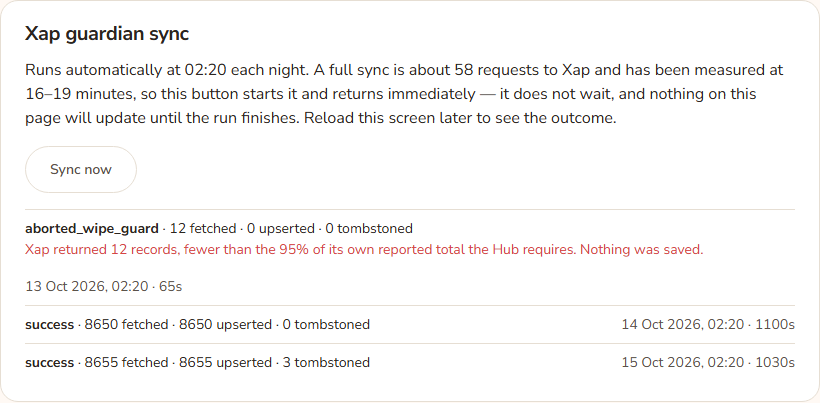
Under the button the page lists the last five runs. Each row shows the status in bold, then how many guardian records were fetched, upserted (added or updated) and tombstoned (marked as no longer in Xap), then the start time and how many seconds it took. A run that failed shows its error in red under the row.
| Status | What it means |
|---|---|
| running | The sync is working now. Reload later. |
| success | Finished and saved. |
| partial_no_deactivate | The records were saved, but the step that marks missing families as gone was skipped as a precaution. Existing families are unaffected. |
| failed | The sync stopped with an error. The error text is shown. The previous data is still in use. |
| aborted_wipe_guard | Xap returned far fewer records than expected, so the Hub refused to save anything. See below. |
| dry_run | A test run that wrote nothing. These come from the maintainers, not from the button. |
The safety checks
Before saving, the Hub checks that Xap's answer is believable. It refuses the whole run (status aborted_wipe_guard) if Xap returned nothing, or fewer than 95 percent of the records Xap itself said it had, or fewer than half of what the last good run had. It also refuses to mark more than a fifth of all families as gone in one run. Families are never deleted. They are only marked as not seen, and a later good run puts them back.
If a check fires, nobody is locked out, because nothing was saved. Do not ask for the limits to be loosened. Find out what Xap returned, then press Sync now again once Xap is healthy.
What the sync brings in
- Each family member's email, status (Active, Archived or On Wait List), centre and children's names.
- The kiosk PIN, stored as a scrambled value. Nobody can read the PIN from the Hub.
- Centres from the portal list, so the Hub's centre list stays in step.
A family member who appears under several centres or families is kept as separate records, so each centre's status is right.
Every option
| Option | What it does | Default |
|---|---|---|
| Sync now | Starts a full sync and returns at once. | |
| Nightly 02:20 run | The automatic sync. It cannot be changed from the console. | On |
| Recent runs list | The last five runs with status, counts and time. |
Questions
Why did Sync now say "started" but nothing happened?
Reload Settings after a minute. If there is no new running row, the sync could not start. The page shows a message only when the server is missing its settings. In other cases the Hub's maintainers can see the reason in the audit trail. A second press while a sync runs is refused.
How long does it take?
About 5 minutes. The whole time you can keep using the console.
Will a sync sign anyone out?
No. It changes who may sign in next time. Someone already signed in is re-checked within a few minutes and can be signed out if they are no longer allowed.
A family in Xap still cannot sign in after a sync.
Check their status. Archived families are never allowed. On Wait List families are allowed only when the wait-list switch is on. Otherwise see Sign-in problems.
Where do I see more than five runs?
The page shows only the last five.
If something goes wrong
- "APP_BASE_URL or CRON_SECRET is not set on this server, so the sync could not be triggered. Nothing was started." The server is missing a setting. Tell the Hub's maintainers.
- "Sync requested. It will appear below as running and then complete in about 5 minutes." This is the normal confirmation, not an error.
- A run row in red under failed or aborted_wipe_guard shows the reason. Tell the Hub's maintainers, quoting the text.
- The Hub also records a failed start (for example a wrong secret or a sync already running) in the audit trail. The screen has already said "started" by then, so check the list after a minute.