
Wait-list families and sign-in
Decide whether families who are on a wait list can sign in and read their centre's policies.
Updated
Xap gives each family one of three statuses: Active, Archived or On Wait List. Active families can always sign in. Archived families can never sign in. The switch Let wait-list families sign in on the Settings page decides whether families who are On Wait List can sign in and read their centre's policies.
The switch is off until someone turns it on. If the Hub cannot read the setting for any reason, it behaves as off. Wait-list families are the ones held back by default, so a fault never lets anyone in by mistake.
Turn it on or off
- In the console press Settings.
- Under Sign-in, find Let wait-list families sign in.
- Read the line under it. It tells you which position it is in.
- Press Turn on or Turn off.
- Wait up to 30 seconds. Then the change applies everywhere.
Example: Demo Park starts taking orientation visits for wait-list families. Casey Example (head office) turns the switch on. A parent on the wait list, shown in Xap as On Wait List, can now sign in with their kiosk PIN or an emailed code and read the Demo Park policies. When Casey turns it off again, that parent is refused at their next sign-in.
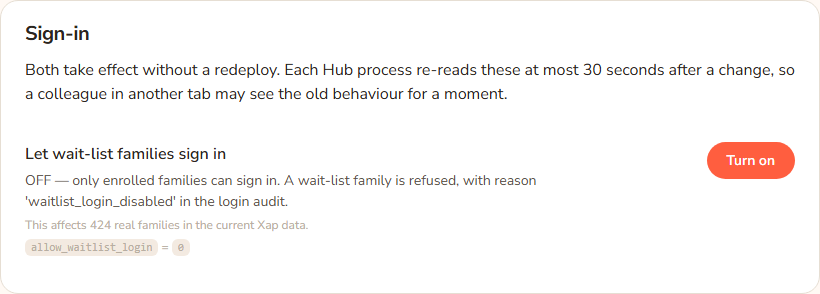
What the screen says
- When it is on, the line reads: "ON — families whose Xap record is 'On Wait List' can sign in and read their centre's policies."
- When it is off, the line reads: "OFF — only enrolled families can sign in. A wait-list family is refused, with reason 'waitlist_login_disabled' in the login audit."
- A small note under it reads: "This affects 424 real families in the current Xap data." That number comes from the Hub's last look at Xap and may differ later.
What a wait-list family sees when it is off
They see the same message as anyone the Hub cannot sign in: "We couldn't sign you in with that email — please contact your centre." The Hub does not say why, so the message does not reveal who is enrolled. The real reason, waitlist_login_disabled, is recorded in the login audit that head office can read on the Activity page.
Every option
| Option | What it does | Default |
|---|---|---|
| Turn on | Wait-list families can sign in and read their centre's policies. | |
| Turn off | Only enrolled families (Active) can sign in. | Off |
| Archived families | Never allowed, whichever way the switch is. | Refused |
| Staff and educators | Not affected by this switch. |
Questions
Does this change what a wait-list family can read?
They read the same as an enrolled family at their centre. The staff-only categories stay hidden. See Categories and who sees them.
How fast does it take effect?
Within about 30 seconds.
How does the Hub know a family is on the wait list?
From Xap, through the nightly sync (see The Xap sync). If a family's status changed in Xap today, the Hub learns of it after the next sync, so the change may not apply until then.
Can I allow just one family?
No. The switch applies to every wait-list family at every centre.
A parent says they cannot sign in. Is it this?
Possibly. Check their status in Xap. If it is On Wait List and the switch is off, that is the reason. See Sign-in problems.
If something goes wrong
The Settings page shows no error for this switch. If the line under it does not change after you press the button, reload the page. The family sees "We couldn't sign you in with that email — please contact your centre." whatever the reason.