
Who can do what
What parents, educators, centre staff and head office can see and do in KAL Hub.
Updated
KAL Hub has four kinds of person. What you see depends on how you signed in, not on what you ask for.
The four kinds of person
- Parent. A family with a child enrolled at a KAL centre. They read the family policies for their centre.
- Educator. Someone who works at a KAL centre, including Beattie Road, and signs in with an emailed code, or through the Portal with a PIN when head office has that switched on. They read all the policies for their centre, including staff-only ones.
- Staff with a KAL Portal login. Centre managers and others who sign in with their Portal password. They read all the policies for their centre, including staff-only ones.
- Head office. Portal users whose role is admin or head office. They see every centre and can edit policies.
What each can do
| Parent | Educator | Portal staff | Centre manager | Head office | |
|---|---|---|---|---|---|
| Read family policies for their centre | Yes | Yes | Yes | Yes | Yes |
| Read staff-only policies (for example Human Resources) | No | Yes | Yes | Yes | Yes |
| Ask KAL | Yes | Yes | Yes | Yes | Yes |
| My Questions (their own past questions) | Yes | Yes | Yes | Yes | Yes |
| Docs tab | No | Yes | Yes | Yes | Yes |
| Audit tab (policy views) | No | No | No | Yes | Yes, all centres |
| Choose or switch centre | If more than one | If more than one | If more than one | If more than one | Yes, any centre |
| Admin (edit policies and settings) | No | No | No | No | Yes |
"Centre manager" here means a Portal role of centre or centre limited. Docs can be switched off by head office. Ask KAL can also be switched off or limited to a number of questions a day.
Printing
Everyone can print a policy. Parents print the family copy. Staff choose between a staff copy and a full copy. See Printing a policy.
Example
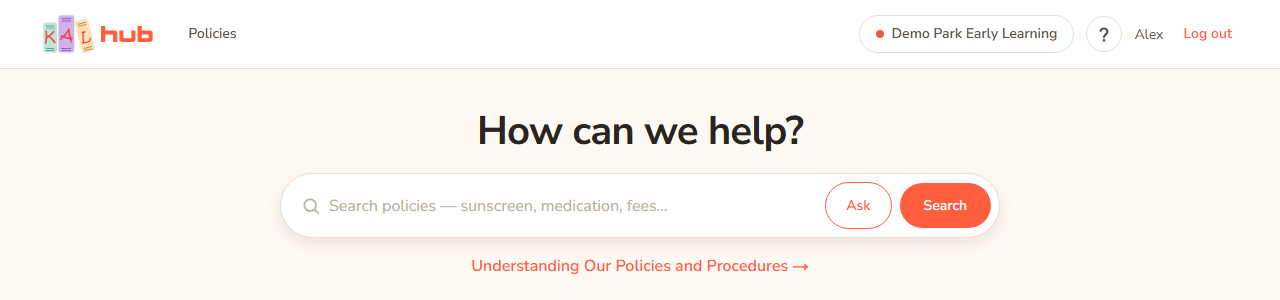
Example: Alex Demo (parent) at Demo Park cannot open the staff-only Human Resources policy. Taylor Demo (educator) can. Jordan Sample (centre manager) can also open the Audit tab for Demo Park. Casey Example (head office) can open Admin and see both centres.
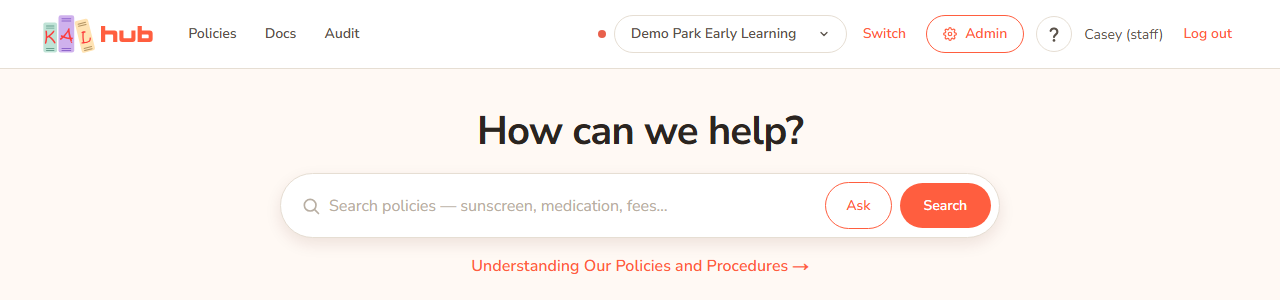
Every option
| Item | What it does | Who sees it |
|---|---|---|
| Policies | The policy library. | Everyone |
| Docs | Documents linked from policies. | Educators, Portal staff, head office |
| Audit | Who has read which policy. | Centre managers and head office |
| Admin | The editing console. | Head office |
| ? | This help. | Everyone signed in |
| Account button | Your name, email, centre and role, with Log out. | Everyone signed in |
| Change PIN | Opens the Portal page to change your PIN. | Educators who sign in through the Portal with a PIN |
Questions
Why can I not see a policy a friend can see?
Some policies are for staff only, and some are for particular centres only.
Why can I not see the Audit tab?
It is for head office and centre managers only.
I am head office. Can I see what a parent sees?
Yes. Use View as a parent.
If something goes wrong
- A page that seems to be missing, such as Docs or Admin, shows the same "not found" page as one that does not exist. If you think you should have access, contact your centre or head office.