
Status and scope - who can read a policy
How Draft, Published and Archived work, how Applies to chooses the centres, and what the publish guard refuses.
Updated
Two settings decide who can read a policy. Status says whether it is live at all. Applies to, also called scope, says which centres it is live at. A third thing, the category, can make a policy staff-only. This topic explains all three and the safety check that stops a policy going to the wrong centres.
Status
| Status | What it means | Who can read it |
|---|---|---|
| Draft | Being written. Never published, or unpublished | Nobody outside the console |
| Published | Live | Families and staff at the centres it applies to |
| Archived | Retired. The text and every version stay | Nobody outside the console |
Change the status with the buttons on the policy page: Publish, Unpublish, Archive and Restore as draft. Unpublishing and archiving work at once. A family who has already read a policy cannot be un-shown it.
Applies to (scope)
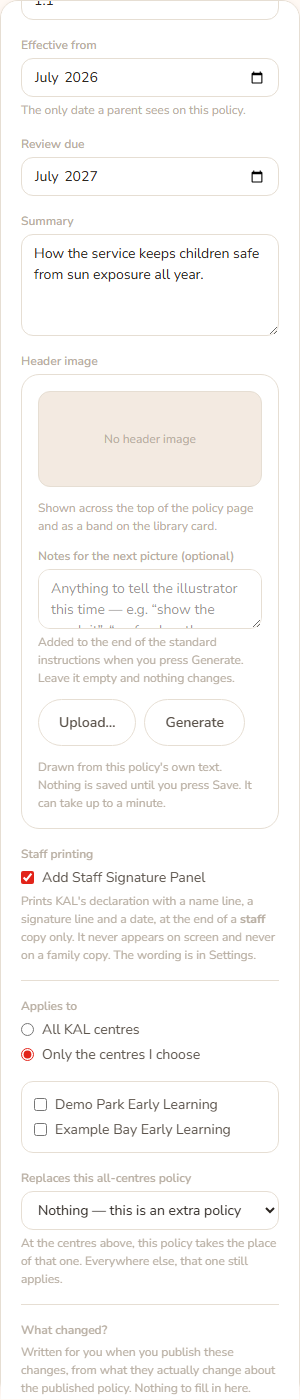
- All KAL centres: every centre gets the policy.
- Only the centres I choose: tick the centres that should have it. The list shows each centre by name.
- Open the policy and press Edit.
- In the side panel, find Applies to.
- Choose Only the centres I choose and tick the centres, for example Demo Park Early Learning.
- Press Save (or Save changes for a published policy).
On the policy page the line next to the status reads All centres or Centres: DMP, EXB. In the list it reads All centres, the codes, or No centres in red if none are chosen.
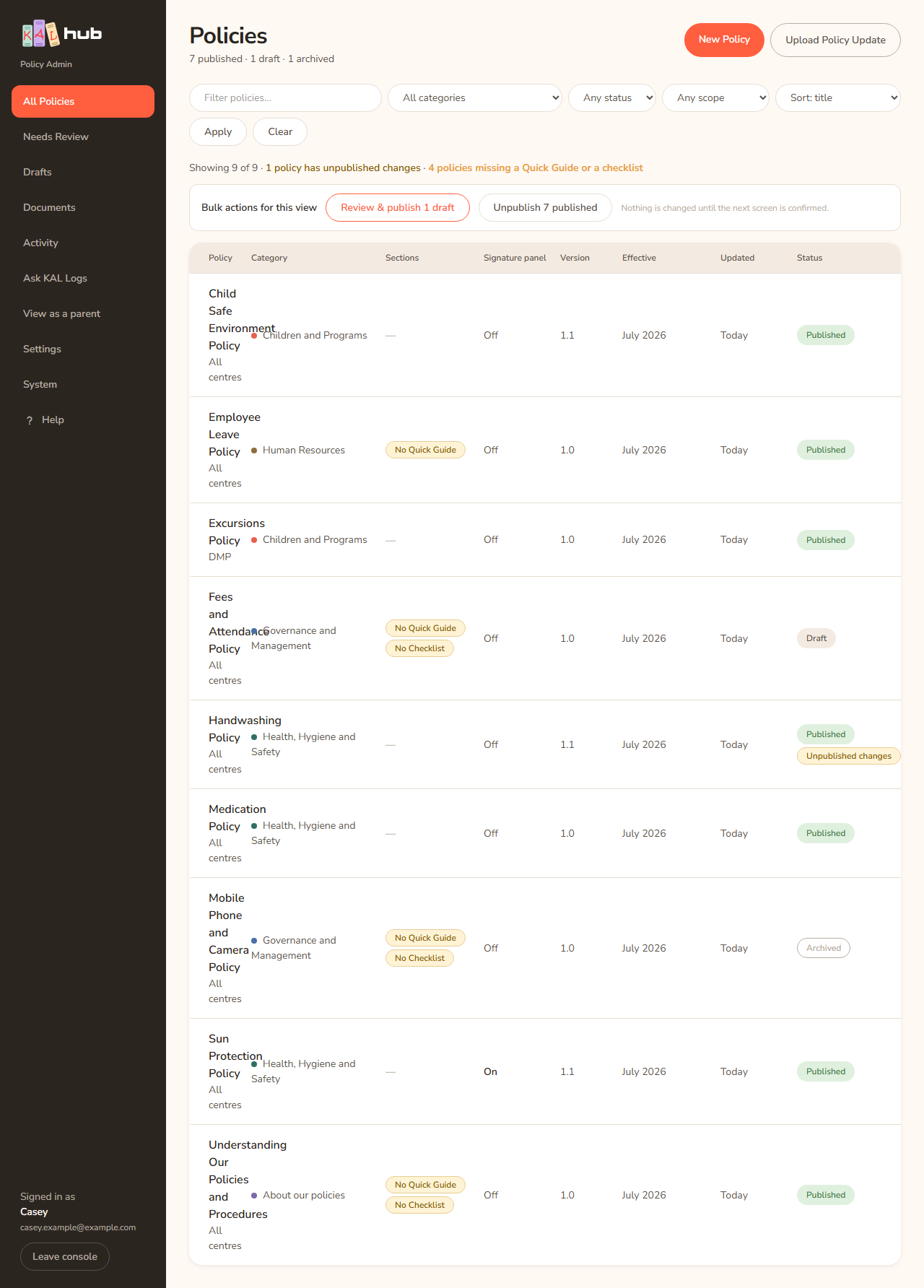
Example: Casey Example writes a Wet Weather Procedure only for Demo Park. Casey chooses Only the centres I choose, ticks Demo Park Early Learning and saves. Families at Example Bay never see it. The list shows DMP under the title.
A centre policy that replaces an all-centres policy
A centre-specific policy can take the place of an all-centres one at the centres it is for.
- Choose Only the centres I choose and tick the centres.
- In Replaces this all-centres policy, choose the policy. The note says "At the centres above, this policy takes the place of that one. Everywhere else, that one still applies."
- Publish both. The all-centres policy is hidden at those centres only while the replacement is also published. If the replacement is still a draft, nothing changes.
The default is Nothing — this is an extra policy.
Staff-only categories
Some categories are for staff only, such as Human Resources. A policy in one is never shown to families, whatever its status or scope. The editor warns you: "Families never see this category — it is staff-only." To change a category's audience, see Categories and audience.
The publish guard
When you publish, the Hub checks that the scope is not obviously wrong. If a policy's own opening wording says it applies only to named centres, but it is set to All KAL centres, the Hub refuses to publish it. The same check runs on every way of changing a live policy: the Publish button, bulk publish, Publish changes on a working copy, saving in the editor and restoring a version. There is no tick box to override it. The fix is the Applies to field: choose Only the centres I choose and tick the centres the text names.
Unpublishing and archiving are never blocked, so you can always take a wrongly scoped policy down.

Every option
| Option | What it does | Default |
|---|---|---|
| Publish | Draft to Published | Not applicable |
| Unpublish | Published to Draft | Not applicable |
| Archive | Retires the policy | Not applicable |
| Restore as draft | Archived to Draft | Not applicable |
| Applies to: All KAL centres | Every centre gets it | Chosen for new policies |
| Applies to: Only the centres I choose | Only ticked centres | Not applicable |
| Replaces this all-centres policy | Hides the all-centres one at those centres once both are published | Nothing — this is an extra policy |
| Category | Decides if the policy is staff-only | Chosen by you |
Questions
Can I publish a policy to just one centre?
Yes. Choose Only the centres I choose, tick the centre, save, then publish.
Why does the list say "No centres" in red?
The policy is set to specific centres but none are ticked, so nobody could see it. Edit it and tick at least one centre, or choose All KAL centres.
Do staff see drafts?
No. Staff and families read only published policies. Drafts and archived policies are visible in the console only.
I archived by mistake. What now?
Press Restore as draft, then Publish when you want it live again.
A centre closed. Should I untick it?
Tick only the centres that are open. Untick the closed centre in each policy that lists it, save, and publish the change. Changing the list of centres themselves is not done in the editor.
If something goes wrong
- "This policy was not published. Its own text says it applies only to named centres, but it is stored as applying to all centres — publishing it would send it to families at every centre. Open Edit, set the centres it applies to under Scope, save, and publish it then. Nothing was changed." Set Applies to as it says.
- "Choose at least one centre, or set the policy to apply to all centres." Tick a centre in the editor.
- "The changes say the policy applies only to named centres, but they are set to apply to all centres — publishing it would send it to families everywhere." Same fix, in the working copy.
- "This policy is published, and this save would leave it visible to the wrong families." The reason follows. Fix Applies to.
- After a bulk publish: "N policies could NOT be published: the text says the policy applies only to named centres, but it is stored as applying to all centres." Fix each one, then publish again.