
The Docs tab - forms and documents
Find the forms and templates that your centre's policies refer to, in one list for staff.
Updated
The Docs tab lists the forms and documents that your centre's policies link to, such as templates to fill in and PDFs to print. It saves you opening every policy to find them. The tab is for staff and educators. Families do not see it.
Open a document
- Press Docs in the header. The page is headed Documents.
- Find the policy the form belongs to. Documents are listed under the policy they come from.
- Press Open beside the document. It opens in a new tab of your browser.
- Save or print it from there.
Example: Taylor Demo, an educator at Demo Park, needs the sunscreen consent form mentioned in the Sun Protection Policy. Taylor presses Docs, finds that policy, and presses Open beside the form.
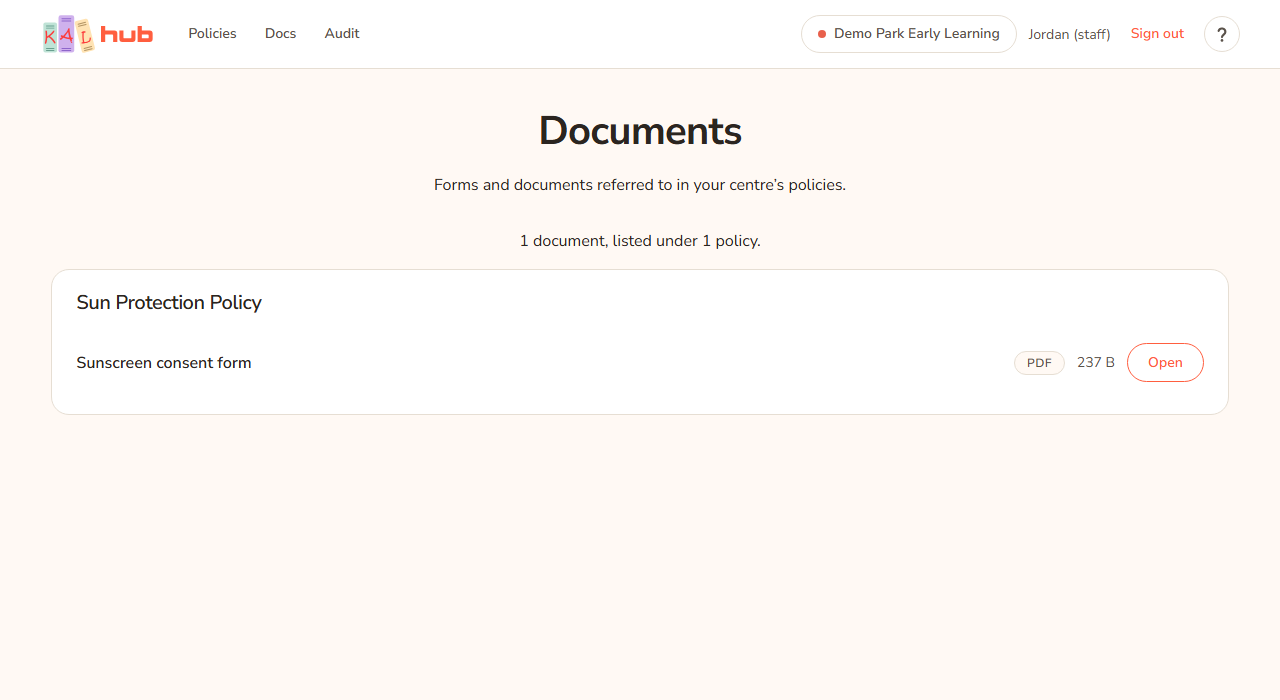

What each line shows
- The document's name in bold.
- The file name in small type, if it differs from the name.
- A label: PDF or Word.
- The size, such as 120 KB or 1.4 MB.
- Open.
Under the heading, the page says "Forms and documents referred to in your centre’s policies." Near the top of the list is a count, for example "6 documents, listed under 3 policies." Press a policy's name to read the policy.
What you can see
- Only documents linked from policies you can read at your centre appear. Switch centre and the list changes. See Switching centre.
- A document that two policies link to is counted once in the total, and listed under each policy.
- If you read a policy page and a form is linked in the text, that link works for you whether or not you use the Docs tab.
Who can see it
| Person | Docs tab | Page |
|---|---|---|
| Staff (portal login) | Yes | Opens |
| Educators (FoundU login) | Yes | Opens |
| Head office | Yes | Opens |
| Families | No | Not found |
Head office can switch the whole tab off. When it is off the tab is not in the header and the page shows as not found. Documents linked inside a policy still open from the policy itself.
Every option
| Option | What it does | Default |
|---|---|---|
| Docs (header) | Opens the page. | Shown to staff when the library is on |
| Policy name | Opens that policy. | |
| Open | Opens the document in a new browser tab. | |
| PDF / Word label | Says what kind of file it is. |
Questions
Why is a form I know about missing?
It must be linked from a published policy that applies at your centre. If the policy is at a different centre, switch centre. If you still cannot find it, ask head office.
Can I add or change a document?
No. Head office manages the documents. See the head office topics.
Why can a parent not open the Docs page?
Families do not get the Docs tab. If a policy a family can read links to a form, the link still works inside that policy.
If something goes wrong
- No documents yet with "Forms and templates appear here as soon as one of your centre’s policies links to one. Everything your centre has published is in your policy library." Your centre has no linked documents. Press your policy library to browse policies.
- The Docs tab is not in the header. Head office has switched it off, or you are signed in as a family member.
- A page not found screen. Same reasons. The page treats them the same way.
- A document will not open. The link may be out of date. Tell your centre so head office can fix it.