
Versions and restore
See every saved version of a policy, compare an old one with now, and go back to it without losing anything.
Updated
Every time a policy is saved or published, the Hub keeps a complete copy as a numbered version. You can look at any of them and put one back. Nothing is ever deleted: a restore writes a new version that carries the old text. So you can always undo a restore by restoring the version before it.
See the versions
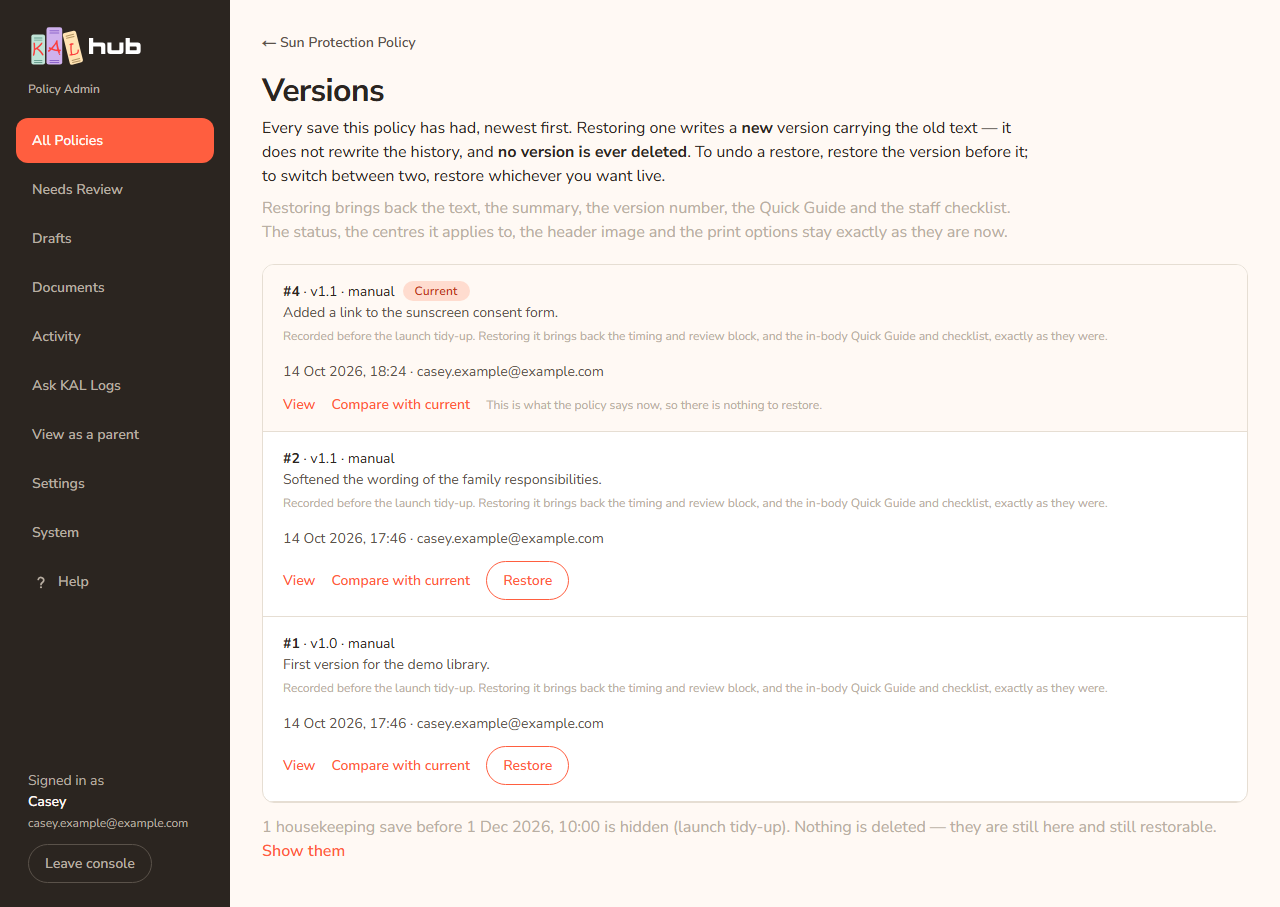
- Open the policy in the console and press Versions.
- The page lists every save, newest first. Each row shows the number (#4), the version label (v2026.1), where it came from, the change note, the time and who saved it.
- The newest row is tagged Current. A row tagged hidden from families does not appear in the family changelog.
Look at one version
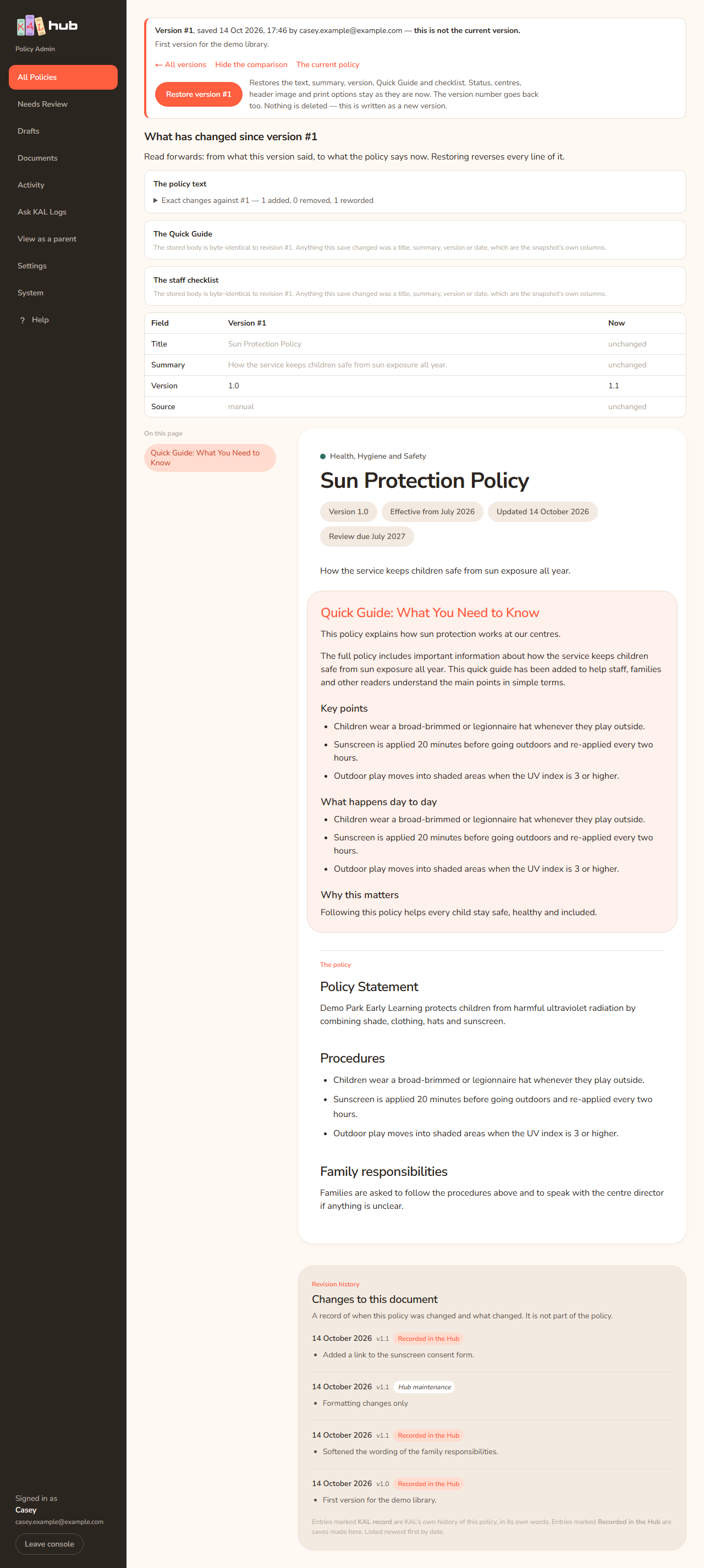
- Press View on a row.
- The page says "Version #3, saved" with the time and who saved it, and whether "this is the current version of the policy" or "this is not the current version."
- Press Compare with current to see "What has changed since version #3", read forwards from that version to now, in three panels: the policy text, the Quick Guide and the staff checklist. Press Hide the comparison to close it. A table shows Title, Summary, Version and Source then and now.
- Press ← All versions or The current policy to leave.
Restore a version
- On the Versions page press Restore on the row you want, or open the version and press Restore version #3. The button changes to Restoring….
- The page shows a green banner: "Restored. The policy now says what it said in the version you chose, saved as version #5. Families see one line about it in the changelog; you can hide that line on the policy page if you would rather they did not."
Example: Casey Example published a change to the Sun Protection Policy that turned out to be wrong. Casey opens Versions, finds version #3 (the one before the change), presses Restore version #3 and reads the green banner. Families now read the old text again, and version #5 is in the list as the restore.

What a restore brings back
It restores the text, the summary, the version number, the Quick Guide and the staff checklist. The status, the centres it applies to, the header image and the print options stay exactly as they are now. The version label goes back too. Nothing is deleted.
Older housekeeping versions
Versions saved before the launch tidy-up are held back by default. A line under the list says "N housekeeping saves before DATE are hidden (launch tidy-up). Nothing is deleted — they are still here and still restorable." Press Show them to see them and Hide them again to hide them. Restoring one of those brings back the timing and review block and the in-body Quick Guide and checklist exactly as they were. See Housekeeping revisions.
Every option
| Option | What it does | Default |
|---|---|---|
| View | Opens one version | Not applicable |
| Compare with current | Shows what changed between that version and now | Off |
| Restore / Restore version #N | Writes a new version carrying that version's text | Asks nothing; one press |
| Show them / Hide them again | Shows old housekeeping saves | Hidden |
| Current tag | Marks the version families read now | Not applicable |
Questions
Does restoring delete the newer versions?
No. No version is ever deleted. To go back again, restore the newer one.
Why is there no Restore button on the current version?
It already says what the policy says now. The row reads "This is what the policy already says, so there is nothing to restore." (on the list: "This is what the policy says now, so there is nothing to restore.")
Does a restore change what families read straight away?
Yes, if the policy is published. The text families read changes at once and a changelog line is written.
Can I restore a draft or archived policy?
Yes. The restore changes the text only. A draft stays a draft.
If something goes wrong
After a refused restore a banner reads Nothing was restored. followed by one of these.
- "That version could not be found, so nothing was changed. It may have been opened from an old link."
- "This policy has no saved versions at all, so there was nothing to restore. Nothing was changed."
- "That version belongs to a different policy, so nothing was changed. Open the Versions list for the policy you meant."
- "This policy was saved by someone else while this page was open, so nothing was changed — restoring would have quietly undone their save. The list below is up to date; press Restore again if you still want to."
- "That version is what the policy already says, so nothing was changed and no line was added to the changelog families read."
- "The save was refused, so nothing was changed. The reason is in the server log — the usual one is the publish-scope guard: a policy whose own text names particular centres cannot be published to all of them." Set the centres in the editor first. See Status and scope.