
Unpublished changes - compare, discard and publish
How edits to a live policy wait as a working copy, how to compare them with what families read, and how to publish or discard them.
Updated
When a policy is published, families are reading it right now. So the editor never changes a published policy when you save. It keeps your edits in a separate working copy, called unpublished changes. Families keep reading the published version until you press Publish changes. You can save, close the editor and come back as often as you like.
Make unpublished changes
- Open a published policy and press Edit. The strip says "This policy is published. What you save here is kept as unpublished changes".
- Make your edits and press Save changes (or Ctrl+S).
- The policy page now shows an orange strip: Unpublished changes since the time, and who started them. It adds "Families still see the published version below." The policy list shows an Unpublished changes chip.
Only one working copy exists for each policy. Anyone in head office who saves adds to the same copy.
Look at your changes

- Preview: shows the policy page with your changes applied. The banner reads Previewing unpublished changes and "Nothing below has been published." Press Show the published version to switch back.
- Compare with live: opens the changes page.
- Discard…: also opens the changes page, because discarding sits next to the list of what you would throw away.
- Publish changes: publishes straight away.
Compare with live
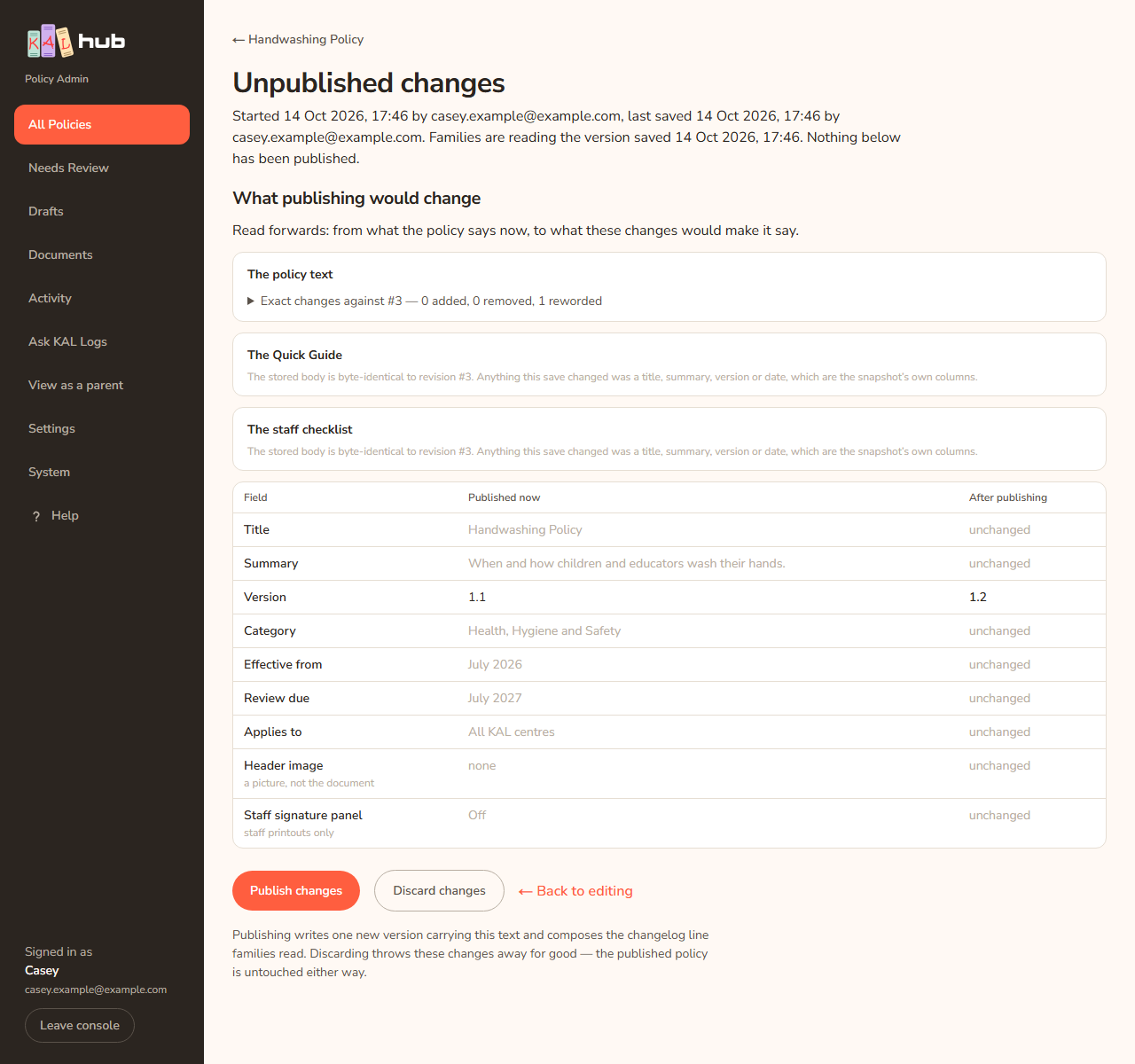
- Read What publishing would change, "from what the policy says now, to what these changes would make it say".
- The panels The policy text, The Quick Guide and The staff checklist show added, removed and reworded paragraphs.
- The table with the columns Field, Published now and After publishing lists title, summary, version, category, dates, Applies to, header image and staff signature panel. Unchanged rows say "unchanged".
- Press Publish changes, Discard changes or ← Back to editing.
Publish the changes
- Press Publish changes, on the policy page, the changes page or the editor.
- The button changes to Publishing…. The Hub writes one new version, writes the changelog line families read, and removes the working copy.
- You return to the policy page with a green banner. It reads "Published. The policy now says what those changes said, saved as version #5. A changelog line is being written for it."
If the changes only touched centres, dates or print options the banner reads "Published. The changes were only to the centres, the dates or the print options, so no new version was written and families get no changelog line."
Example: Casey Example adds a sentence about sunscreen to the Sun Protection Policy, presses Save changes, then Compare with live. The text panel shows one Added paragraph and every row in the table says unchanged. Casey presses Publish changes. The banner says it was saved as version #4.

Discard the changes
- Press Discard changes (changes page or editor). The editor asks "Throw away these unpublished changes?" and explains "The published policy is not touched — families keep reading exactly what they read now. The changes themselves cannot be brought back."
- Confirm. The working copy is deleted.
Discarding cannot be undone. The published policy is not touched either way.
When the live policy has moved on
If someone restores an old version or publishes another change after your working copy was started, the strip turns red: "The live policy changed after these changes were started." Publish changes is greyed out. Publishing would overwrite a version written after yours. Press Compare with live, read what is different, and then start again from the current text. Copy anything you want to keep from your working copy first.
Every option
| Option | What it does | Default |
|---|---|---|
| Save changes | Saves into the working copy. Families see nothing new | Shown in the editor for a published policy |
| Publish changes | Makes the working copy the published version | Greyed out if stale |
| Preview | Shows the policy with the changes applied | Off |
| Compare with live | Shows the changes page | Not applicable |
| Discard changes / Discard… | Deletes the working copy | Asks first in the editor |
| ← Back to editing | Returns to the editor | Not applicable |
Questions
Is a draft policy the same as a working copy?
No. A draft policy has never been published, so families see nothing. Saving a draft policy writes straight to it. A working copy only exists for a published policy (or one that already has changes waiting).
Can two people edit the same working copy?
Yes, but only one save wins at a time. If your save is refused, reload and carry on. Your work is kept in the browser.
Does an unpublished working copy stop a policy being unpublished?
No. You can still press Unpublish or Archive. The working copy stays until you publish it or discard it.
Why did publishing write no new version?
Because only dates, centres or print options changed. Nothing the policy says changed.
If something goes wrong
After a refused publish a banner reads Nothing was published. followed by one of these.
- "That policy could not be found, so nothing was changed."
- "There are no unpublished changes on this policy — somebody may have published or discarded them while this page was open."
- "The live policy changed after these changes were started, so publishing them would have overwritten a version written later. Compare with live and start again."
- "Those changes say exactly what the published policy already says, so nothing was written and no line was added to the changelog families read. Discard them instead."
- "The changes say the policy applies only to named centres, but they are set to apply to all centres — publishing it would send it to families everywhere. Open Edit, set the centres under Scope, save, and publish then."
- "Somebody saved or published these changes while this page was open, so nothing was written. Reload to see where they stand."
- "The save was refused, so nothing was changed. The reason is in the server log." Contact the person who looks after the Hub.
- "The picture those changes carry is not in the store any more, so publishing would have left a broken image on a live policy. Open Edit, add the picture again, and publish then."
Other messages:
- "The changes could not be published. Nothing was changed — your work is still saved."
- "The changes could not be discarded. Nothing was lost."
- "Nothing the policy SAYS has changed. Publishing these changes will change the centres, the dates, the category or the print options only — so no new version is written and families get no changelog line."
- "The live policy changed after these changes were started. They were begun from version #3 and the policy is now at #4 — it was restored or updated in between. Publishing these changes would overwrite that later version with a document written before it, so publishing is refused."