
System - AI calls and cost
See every call the Hub made to the AI provider, whether it worked, what it cost, and the full error on any that failed.
Updated
The AI calls tab (System, then AI calls) lists every call the Hub has made to the AI provider. This includes Ask KAL answers, embeddings, revision notes, Quick Guides and checklists. Each failed call shows the provider's full error. Use it to find out why an AI button failed and what the AI costs.
Find a failed call
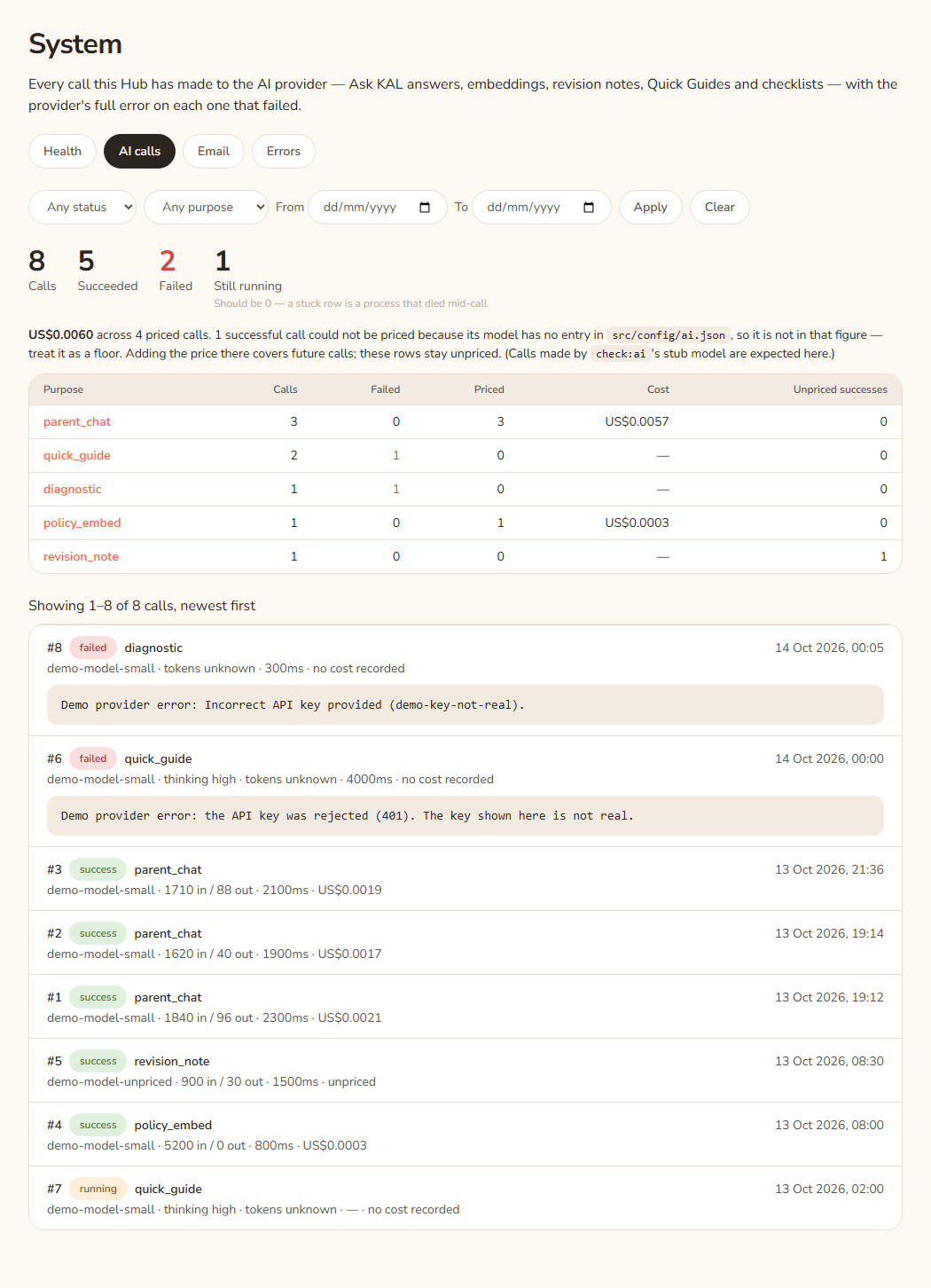
- Open System in the console and press AI calls.
- Choose Failed under Any status. Optionally choose a purpose, or set From and To dates.
- Press Apply.
- Open the newest row. Its error text appears under it.
Example: Casey Example presses Generate Quick Guide and it fails. On AI calls, the newest row has the pill "failed" and the purpose of the Quick Guide. Under it is the error, for example that the key is missing. See System health to check configuration.
Read the figures
Above the list:
- Calls: all calls in the current filter.
- Succeeded, Failed.
- Still running: "Should be 0 — a stuck row is a process that died mid-call". Fix it with Sweep stuck AI calls on the Health tab.
The cost sentence
One sentence under the figures says either "{amount} across N priced calls." or "No call in this view carries a price". If some successful calls could not be priced, it says so and tells you to treat the total as a floor. The price list is in the Hub's AI settings. Adding a price covers future calls only. Test calls from a checking tool use a stub model and are expected to be unpriced.
The purpose table
If there are calls, a table shows one line per purpose with these columns: Purpose, Calls, Failed, Priced, Cost, Unpriced successes. Press a purpose to filter the list to it.
Read one call
The top line has the number (for example #150), a status pill (running, success or failed), the purpose and the time. The second line has the model, "thinking" level if used, tokens "in / out" (or "tokens unknown"), time taken, and cost ("unpriced" for a successful call with no price, "no cost recorded" otherwise). A failed call shows an error box. Press it to read all the text.
Every option
| Option | What it does | Default |
|---|---|---|
| Any status | Filter by running, success or failed. | Any status |
| Any purpose | Filter by what the call was for. The list shows the purposes the Hub has actually recorded. | Any purpose |
| From / To | Date range. | Empty |
| Apply | Applies the filter. | |
| Clear | Removes the filter. | |
| Purpose link in the table | Filters to that purpose. | |
| Older → / ← Newer | Move through pages of 100. | Page 1 |
Questions
What is a "running" row that never finishes?
The Hub writes "running" before it asks the provider. If the server stops mid-call, nobody ever finishes the row. The Hub marks such rows as failed after about 30 minutes. Duration and cost stay blank because the row's age is not the call's length.
Why is the cost blank on a failed call?
A failed call has no cost recorded. "no cost recorded" is shown.
Does it show what families asked?
No. This list shows the call itself, not the family's question. Questions are in Ask KAL logs.
If something goes wrong
- "No AI calls match this filter." Press Clear.
- "No calls on this page — the filter may have moved since the link was made." Press Clear.
- "No call in this view carries a price — so there is no total to show, rather than a total of nothing." The calls shown have no price in the AI settings.