
Sign in problems
What to do when you cannot sign in to KAL Hub, and why the page never says exactly what is wrong.
Updated
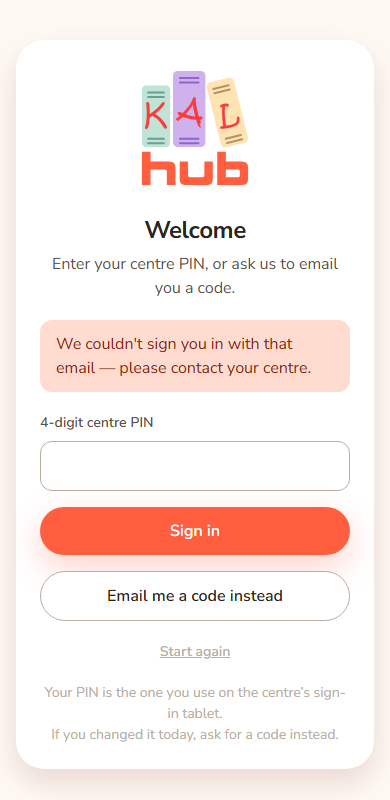
When sign in does not work, the Hub shows one short message. It is the same whatever the cause. That is on purpose: a page that said "that email is not registered" would tell strangers who is a KAL family.
Try these in order
- Check the email address. Use the one your centre has for you. Parents use the family email. Staff use their work email. An email address typed with accented letters or other characters outside the plain English alphabet is refused in the same way as an address the Hub does not know, and no code is sent. Type the address exactly as your centre has it.
- If you used a PIN, press Email me a code instead. A PIN changed today does not reach the Hub until tomorrow.
- If you used a code, press Start again and ask for a new one. Start again is also on the Portal password step. Codes last 10 minutes and work once.
- If no code came, look in junk or spam, then wait a minute before asking again.
- If you have a KAL Portal login, use your Portal password or Sign in with KAL Portal.
- If it still fails, contact your centre. They can check which email is on record for you.
Example: Alex Demo types the PIN and sees "We couldn't sign you in with that email — please contact your centre." Alex changed the PIN on the tablet this morning, so Alex presses Email me a code instead, types the code from the email and gets in.
Why is sign in paused?
After several failed tries on one email, or many from one network, sign in pauses for a short while. Wait and try again later, or ask your centre. Do not keep pressing the button; waiting is what clears it. The page does not say that it is paused. It shows the same message as any other refusal.
Who can fix what
| Problem | Who to contact |
|---|---|
| Your email is not recognised | Your centre. They check the enrolment record |
| A family has no PIN | Use an emailed code. Your centre can check the PIN record |
| An educator cannot sign in | Your centre manager, who checks the staff record (foundU, or the Portal staff list at Beattie Road) |
| A Portal login does not work | Head office |
Every option
| Message or control | What it means | What to do |
|---|---|---|
| Email me a code instead | A way in that does not need a PIN. | Press it |
| Start again | Go back to the email box. It shows on the PIN, code and Portal password steps. | Press it if a step went wrong |
| Sign in with KAL Portal | A way in for Portal users. | Use it if it shows |
Questions
The page does not say why it failed
That is deliberate. Only head office can see the reason, in the sign-in record.
I got a code but it does not work
Codes last 10 minutes and work once. Ask for a new one with Start again. Check you used the newest email.
I am at a new centre or have a new email
Tell your centre so the record is updated.
Can head office see why I could not sign in?
Head office can see the sign-in record, which lists the reason for each refused try. They do not see your password or the code.
If something goes wrong
- "We couldn't sign you in with that email — please contact your centre." The one message for every refusal. Follow the steps above.
- "Please enter your email address." The email box was empty or not an email.
- "That took too long — please start again." You waited too long on a step. Enter your email again.
- "Something went wrong. Please try again." Something unexpected happened. Try again.
- "Portal sign-in did not work. Try again or use your email code." The Portal sign in failed. Try again, or use your password.