
Troubleshooting - common problems and where to look
The most common problems in KAL Hub, what you are seeing, what to try, and which help topic has the full answer.
Updated
Most problems in KAL Hub have a short fix. Find what you see below. Each section says what to try and where the full answer is. If it is still not fixed, contact your centre. Head office staff have extra checks in the console, listed at the end.
Signing in
"We couldn't sign you in with that email — please contact your centre."
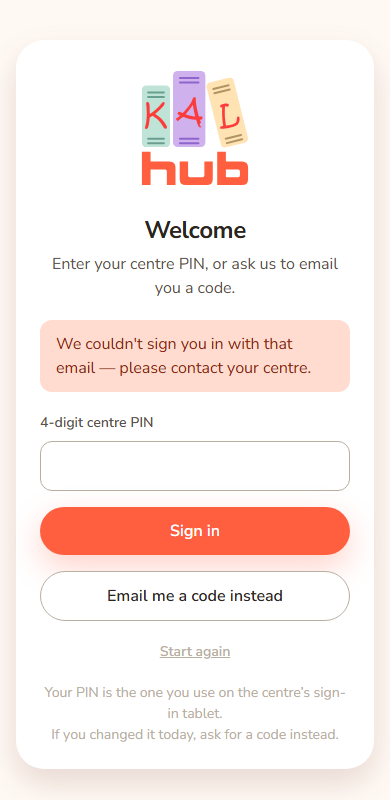
- Check the email for typing mistakes. Use the email address your centre has on file for you.
- If you were asked for a centre PIN and it did not work, press the button to email yourself a code instead.
- If it still fails, ask your centre to check that your details are right and that your enrolment is current.
Staff, educators and head office: use the email you use at work. Staff with a KAL Portal login use their Portal password. See Sign-in problems, Staff sign-in and Wait-list sign-in.
"Please enter your email address."
The box was empty or did not hold an email address. Type it in full and press the button again. See Signing in.
My code never came
- Check your spam or junk folder.
- Wait a minute and ask for a new code. The Hub will not send a second code within the first minute.
- Use the newest code only. A code works once and expires after a short time.
- Ask your centre if it still does not arrive.
See Sign in with a code. Head office can check if it was sent in the Email log.
"That took too long — please start again."
You stayed on one step of signing in for more than ten minutes. Start again from the email step.
"Something went wrong. Please try again."
Something unexpected broke on the sign-in page. Try once more. If it repeats, tell your centre the time it happened.
I tried too many times
After several wrong tries the Hub stops letting you try for a while. Wait about fifteen minutes. If you still cannot sign in, use the emailed code or contact your centre. Do not keep trying.
My PIN does not work
Use the four digits from the sign-in tablet at your centre. If you changed it recently, it can take until the next morning to reach the Hub. Press the button to email yourself a code. If your family has no PIN on file, the code is the way in. See Sign in with your centre PIN.
Being signed out
I was signed out
The Hub signs you out after a time without activity. Families stay in for about a week, staff and educators for about a day. Sign in again. Your place is kept, because after sign-in you are returned to the page you wanted. See Signing out and timeouts.
"Your parent view timed out" or "Your parent view has ended"
This is for head office using "View as a parent". A parent view closes after 15 minutes without a click. The other message means your head office access could not be confirmed. Press the button on the page to stop the view and go back. See View as a parent.
"Please sign in again to ask a question."
Your visit ended while you were on Ask KAL. Sign in and ask again.
Policies and centres
I cannot find a policy
- Check you are looking at the right centre. Policies can be for all centres or for one. See Choosing a centre and Switching centre.
- Use the search box on the policy library. See Policy library.
- Some policies are for staff only. Families do not see them. See Who can do what.
- If you still cannot find it, ask your centre.
The page says "This page did not load"
The Hub says "Something went wrong at our end — it is not something you did, and nothing you have read or saved has been lost. The problem has been recorded for the KAL team."
- Press Try again. Most of the time a second attempt works.
- If it keeps happening, tell your centre and quote the reference code shown under the message.
- Press Back to the Hub to carry on.
Head office can look up the reference in Errors.
A policy picture or document is missing
Tell your centre or head office with the name of the policy. They can check the storage on the System health screen.
Printing looks wrong or has the wrong page
Staff can print a Staff, Full or Family copy of a policy. If the printed page is not what you expect, check which copy is chosen. See Printing a policy. Families always get the Family copy.
I cannot see the Docs tab
The Docs tab is for staff and may be switched off by head office. See Documents tab.
Ask KAL
"Ask KAL is turned off just now. Your centre's policies are all still here to search and read, and reception can answer anything you cannot find."
Head office has switched Ask KAL off. Use the policy search, or ask your centre.
"You have asked 30 questions today, which is as many as Ask KAL takes in a day. It will start answering again within 24 hours. In the meantime you can search the library or ask at reception — they are always happy to help."
You reached the daily limit. Search the library, or try again tomorrow.
"Something went wrong looking that up. Please try again in a moment, or ask at reception."
A fault on our side. Try again in a minute. Tell head office if it keeps happening.
Ask KAL says it cannot answer my question
Ask KAL answers only from your centre's policies. It will say so if they do not cover your question, for example fees, hours or something about one child. Ask your centre instead. See Ask KAL and My Questions.
For head office
Where to look in the console:
| Problem | Where to look |
|---|---|
| A family cannot sign in | Activity log: search their email and read the reason. |
| A code never arrived | Email log. |
| An AI button failed (Quick Guide, checklist) | System health, then AI calls. |
| A family read out a reference code | Errors: paste it into Digest. |
| Ask KAL gave a poor answer | Ask KAL logs. |
| New families are not signing in | Xap sync: check the guardian sync is current on System health. |
| Educators are refused | Activity log: the reasons starting foundu_. |
Questions
Who do I contact?
Your centre first. They can reach head office.
Can the Hub tell me why I was refused?
Not on screen. Only head office can see the reason. It is kept for the family's privacy.
Is my question to Ask KAL private?
Head office can review questions so they can check answers are correct. See Privacy and security.
If something goes wrong
If none of the above fits, write down the time, the page, what you pressed and any reference code shown, and give it to your centre.