
Housekeeping revisions - hide the launch tidy-up
Fold away behind-the-scenes saves in the admin-only Hub saves list, and show them again when you need them.
Updated
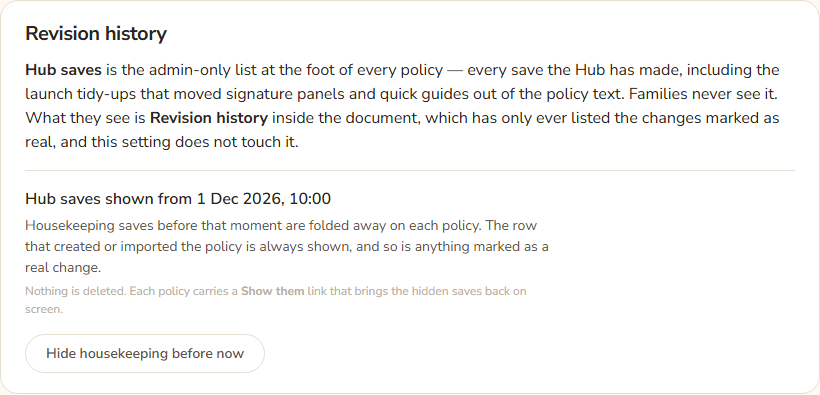
Every time a policy is saved, the Hub records a copy called a revision. Some saves are behind-the-scenes tidy-ups, such as moving signature panels or quick guides out of the policy text during launch. These make the admin-only Hub saves list long and noisy. The Hide housekeeping before now button folds the older tidy-ups away. Nothing is deleted.
There are two lists of history. Do not mix them up.
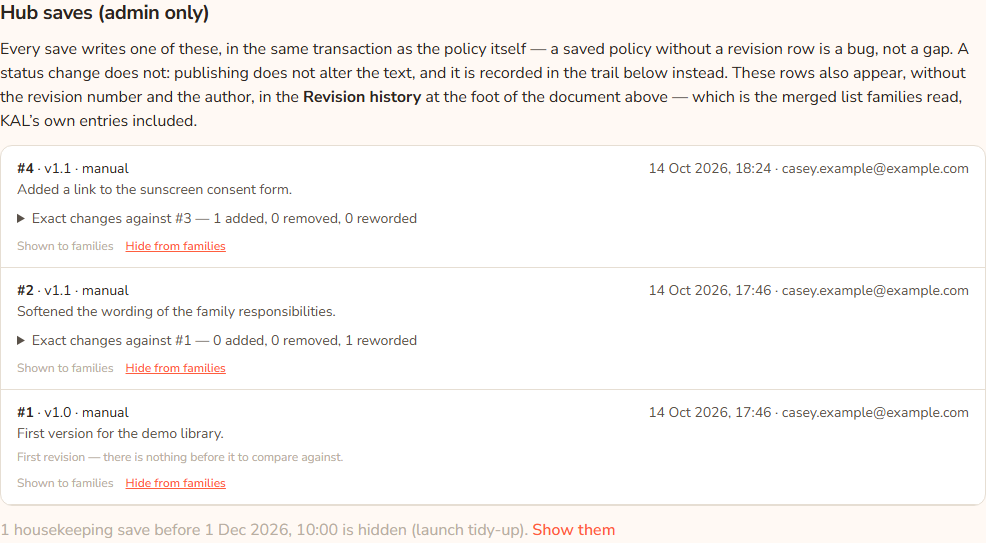
- Hub saves (admin only) is at the foot of each policy in the console. It shows every save, with the revision number and who pressed Save. Head office only. This is the list the button below affects.
- Revision history is inside the policy that families and staff read. It shows only changes marked as real. The button does not touch it.
Hide the old housekeeping
- In the console press Settings.
- Scroll to Revision history.
- Read the line in bold. It says either Every Hub save is shown or Hub saves shown from a date and time.
- Press Hide housekeeping before now. The button reads Hiding….
- The bold line now shows the current date and time.
From then on, on every policy's Hub saves list, tidy-up saves made before that moment are folded away. The first revision of a policy is always shown, because it says where the policy came from. Anything marked as a real change is always shown, however old.
Example: After the launch tidy-ups finish, Casey Example presses Hide housekeeping before now. On the Demo Park Medication policy, 4 housekeeping saves are hidden and the list shows the first revision and Casey's later edits.
See the hidden saves
- Open a policy in the console (All Policies, then the title).
- Scroll to Hub saves (admin only).
- Under the list, if saves are hidden you will see a line such as "4 housekeeping saves before 14 Oct 2026, 9:00 am are hidden (launch tidy-up)." Press Show them.
- The line becomes "Showing 4 housekeeping saves from before … (launch tidy-up)." Press Hide them again to fold them away.
Mark one save as hidden from or shown to families
Under each save in Hub saves a small line says either Hidden from families — Hub maintenance or Shown to families. The link beside it says Show to families or Hide from families. Press it to move that line between the two histories. It changes at once. No confirmation, because it only moves a line and the other button puts it back.
Every option
| Option | What it does | Default |
|---|---|---|
| Hide housekeeping before now (Settings) | Sets the cutoff to this moment. Older tidy-up saves are folded away on every policy's Hub saves list. | No cutoff: every save shown |
| Show them / Hide them again (on a policy) | Shows or folds the hidden saves for that policy, for this view only. | Hidden |
| Show to families / Hide from families (per save) | Moves one save into or out of the Revision history families read. | Depends on the save |
Questions
Does this delete anything?
No. Every save is kept. Those saves are also the only copy of text that was removed from the policies at launch.
Does it change what families see?
No. Families read Revision history, which only ever shows changes marked as real. This button affects the admin-only list.
What counts as housekeeping?
A save marked as hidden from families (maintenance), after the first revision, made before the cutoff. A save you or a colleague made as a real edit is not hidden.
I pressed the button but the list did not change.
The cutoff only hides saves that are marked as hidden from families. If the saves are shown to families, they stay. Use Hide from families on those saves first.
Can I move the cutoff back?
No. The button only moves it to now. To see older saves use Show them on the policy.
If something goes wrong
The Settings page shows no error for this button. If the bold line does not change, reload the page.
- "No revisions recorded." The policy has no saves yet.
- "Every save on this policy is launch housekeeping from before the cutoff." All its saves are hidden. Press Show them.
- "No change note. Nobody typed one and none was written — npm run summarise:revisions selects exactly this." A save has no note. Ask the Hub's maintainers to run that command if you want one written.