
System - email log
Check whether a login code or other email was sent, refused or left pending, and read the mail server's full error.
Updated
The Email tab (System, then Email) lists every message the Hub has tried to send and what the mail server said. It answers the support call "my code never came". Every row shows a real email address. It is for head office only, and nothing on it should be copied elsewhere. Examples here use demo people.
Find out if a code was sent
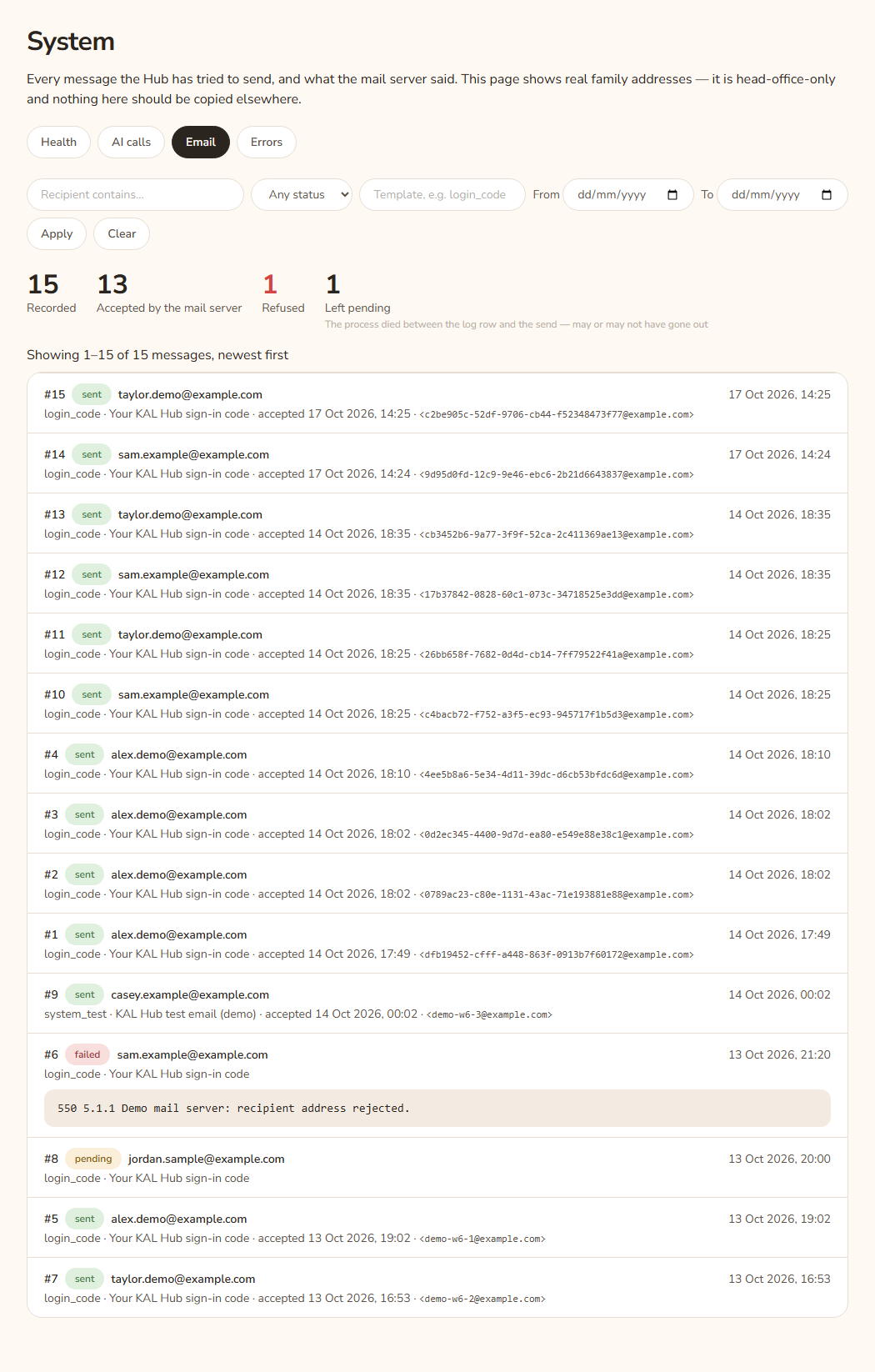
- Open System in the console and press Email.
- Type part of the family's address in Recipient contains….
- Press Apply.
- Read the status pill on each row: sent, failed or pending.
Example: Alex Demo says no code arrived. Type alex.demo and press Apply. A row with the template login_code and the pill sent shows the time the mail server accepted it and a message id. The Hub's part is done. Ask Alex to check spam, and to ask for a new code.
What each status means
- sent ("Accepted by the mail server"): the mail server took the message. It may still land in spam or be delayed. The log does not see delivery.
- failed ("Refused"): the mail server refused it. The full error is under the row.
- pending ("Left pending"): the Hub wrote the row, then stopped before it learned what happened. The message may or may not have gone out.
Read the row
Top: the number, the status pill, the recipient and the time. Second line: the template (or "no template"), the subject (or "no subject"), "accepted" and a time if sent, and the message id if there is one. A failed row shows an error box with the full text.
Every option
| Option | What it does | Default |
|---|---|---|
| Recipient contains… | Shows messages to addresses containing the text. | Empty |
| Any status | Filter by pending, sent or failed. | Any status |
| Template | Exact template name, for example login_code or system_test. |
Empty |
| From / To | Date range. | Empty |
| Apply | Applies the filter. | |
| Clear | Removes the filter. | |
| Older → / ← Newer | Move through pages of 100. | Page 1 |
The four figures above the list are Recorded, Accepted by the mail server, Refused and Left pending.
Questions
Can I see the content of the email?
No. The log shows the subject, template, recipient and result. It does not store the code.
The log says sent but the person has nothing. What now?
Ask them to check spam and junk. Then ask for a new code. The Hub waits a minute before it sends a second one, so a very fast second press does not send anything new.
How do I test that mail works?
Use Send a test email on the Health tab. It sends to your own address.
How long are rows kept?
About 90 days.
If something goes wrong
- "No messages match this filter." Press Clear.
- "No messages on this page — the filter may have moved since the link was made." Press Clear.
- If many rows say failed with a similar error, the mail settings need fixing. Pass the error text to the person who looks after the server. See Troubleshooting.